
From WhatsApp to Payment: Organize the Flow Without Losing Orders

Learn how to organize orders, inventory, and payment in WhatsApp sales. Build a reliable flow for your store without losing track
If your store sells through WhatsApp, you already know how it starts: a message comes in, the customer asks for the price, chooses the product, asks for photos, changes the quantity, sends payment confirmation, and wants to know whether delivery can still happen today. The problem is that without WhatsApp order management, that sale can get lost in the middle of all that information.
In the United States, WhatsApp is not as dominant as it is in Latin America, but it is still a meaningful communication channel. According to Pew Research Center, 29% of U.S. adults use WhatsApp, while another Pew analysis says 68% use Facebook. For local stores that sell through messages, that matters.
Meta itself has said that more than 175 million people message a WhatsApp Business account every day.
The problem is not the channel itself. WhatsApp is already acting like a sales counter. What is missing is the rest of the sales journey being organized around it.
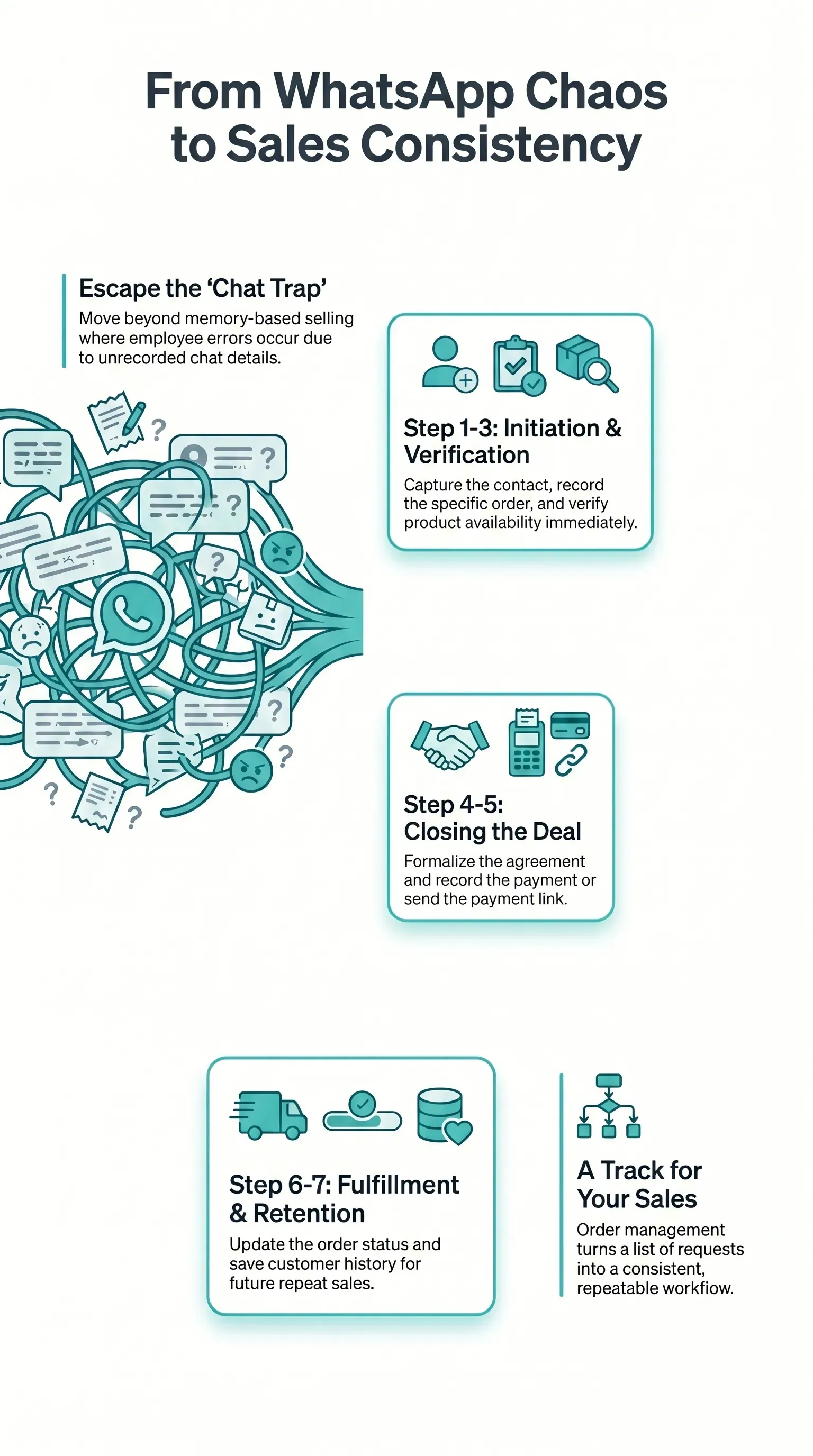
The problem starts when the order stays trapped in the chat
Many stores lose sales not because they lack customers, but because the sale gets scattered across platforms.
Picture this: the order starts in WhatsApp, but inventory is somewhere else. Payment details were agreed on in a voice note. Confirmation came later in another message. The customer name is saved with no context. And when a last-minute change comes up, someone has to reread the whole chat just to figure out what was actually agreed to.
At first, that can still seem manageable. But as order volume goes up, running the store like this becomes impossible.
In a recent Reddit discussion about businesses taking orders through WhatsApp, the original poster describes the situation clearly: unstructured messages, manual confirmations, changes getting buried in chats, and payment follow-up turning into an uncomfortable back-and-forth.
They suggest the breaking point often shows up somewhere between 40 and 60 orders a day. That is not a formal statistical benchmark, but it is a useful snapshot of what many store owners experience.
Before it turns into full chaos, improvising inside WhatsApp can still look manageable. Give it a little time and the risk gets harder to ignore.
The warning signs usually look like this:
- an order was answered but never logged
- an item was sold without checking availability
- payment confirmation was received but not tied to the right order
- a charge got forgotten along the way
- a returning customer has to explain everything all over again
WhatsApp is not the villain in your store. It just was not built to be, all by itself, your catalog, order queue, inventory control, customer history, and payment area at the same time.

What the full sales flow actually is
When people talk about going "from WhatsApp to payment," this is not about adding a complicated process to make your day harder. It is really about connecting steps that are currently loose inside your business.
The full sales flow has seven moments:
- The customer gets in touch.
- The product or order is recorded.
- Availability is checked.
- The agreement is formalized.
- Payment is recorded or sent.
- The order status is updated.
- The customer history is saved.
It sounds basic, and that is exactly why so many stores underestimate the problem.
In practice, the chaos starts when one of these steps exists only in the conversation and never makes it into a reliable workflow.
Look at a simple example:
- a customer chooses two products
- asks to change the color
- asks whether they can pay later
- sends proof of part of the payment
- checks the next day to see whether the delivery is already on the way
If that stays only in the chat, every employee has to remember everything. But if that becomes a properly organized order, every step finally has a place inside the whole process.
That is where order management becomes important. It stops being just a list of requests and starts becoming the track the sale runs on.
What needs to leave WhatsApp and enter the workflow
Not everything needs to leave WhatsApp, and you do not have to change the way you talk to customers today. The conversation can stay there.
What has to leave is the part that cannot depend on your memory.
Order
The order needs to exist outside the conversation. Item name, quantity, notes, variation, and deadline cannot stay buried in the middle of dozens of messages.
Inventory
Nothing wears down customer trust faster than letting someone buy and only later telling them the product is out of stock. That is why the order and inventory control need to work together.
Customer
When the customer comes back, the store needs to know who they are, what they bought, and where the relationship left off. Customer records exist for exactly that.
Formalization
So much confusion starts with poorly defined agreements. An online receipt cuts down on noise and makes it clear what was recorded, how much the order costs, and how it will be paid.
Payment
Charging and confirmation cannot live only in screenshots, loose text messages, or voice notes. The payment needs to be tied to the order.
When those five layers leave the conversation and enter a workflow, WhatsApp goes back to being excellent for sales, helping your store stay close to customers while speeding up communication.

How to tell when your store has gone past the limit of improvisation
The problem does not always show up as instant chaos. In most stores, it shows up as small repeated losses.
You feel like sales are still happening, but operations have started charging too high a price.
Some signs are very clear:
- you reply quickly, but the customer still needs to ask again whether the order was confirmed
- someone on the team sets aside a product before checking payment
- proof of payment arrives, but nobody knows which order it belongs to
- the customer asks for a simple change and it gets lost in the middle of the messages
- at the end of the day, you need to reopen several chats just to understand what happened and what is still pending
When that becomes routine, the business is no longer running in the best possible way. It is burning too much time to deliver the same outcome.
And the cost goes far beyond losing an order. It means losing margin to rework, losing confidence in the service experience, and losing energy trying to remember what should already be recorded.
How to organize the full sales flow
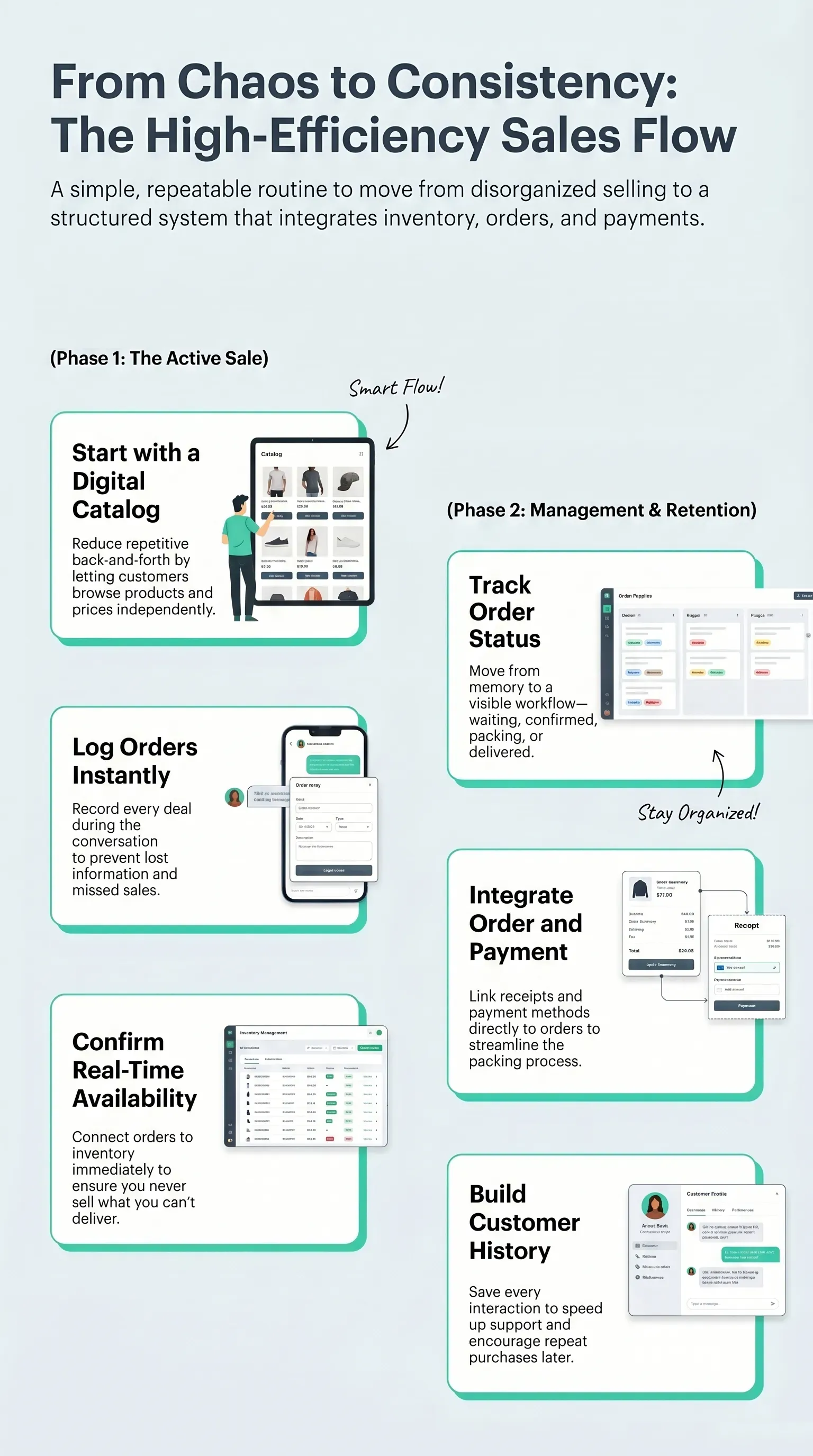
You do not need a heavy operation to make this work. The most useful path is to build a simple and efficient routine.
1. Start with a clear catalog
When the customer has to ask about absolutely everything, service is already slow from the beginning. A digital catalog helps reduce repetitive back-and-forth and moves the sale forward faster.
2. Record the order right away
If the order was agreed to, log it right away. Forget "I will write it down later" or "I will record it when things calm down." Any order that does not enter the workflow during the conversation is much more likely to get lost later.
3. Confirm availability first
A good sale is one you can actually deliver. If the order is already connected to inventory, you are not selling blind.
4. Formalize the agreement
Use a receipt, an order summary, or another clear record. That avoids the bad situation where the customer and the store remember different versions of the same deal.
5. Mark the order status
Waiting for payment, confirmed, being packed, delivered. When the status exists, you stop depending on memory.
6. Close the loop in the customer history
After the sale, the operation should not disappear. A saved history helps with repeat purchases, support, and faster service later.
7. Connect payment and order
Many store owners do record the order, but still treat payment like a separate conversation, which keeps part of the problem alive.
When the amount paid, payment method, and proof of payment are tied to the right order, closing the sale moves to another level. You know who paid, how much they paid, what is still missing, and what can already move on to packing or delivery.
That is the kind of organization that shortens the distance between "interested customer" and "order truly completed."
If your store also uses a website or digital catalog to receive orders, it is worth looking at an online ordering system as a natural extension of that workflow.
What changes when everything enters the same flow
When operations move out of scattered WhatsApp conversations, the gains show up fast.
Fewer lost orders
You no longer need to hunt through conversations to figure out what was agreed on.
Fewer inventory mistakes
The order is no longer separate from inventory availability. The customer stops getting frustrated by surprises.
Less rework
The customer does not need to repeat details they had already shared.
Faster payment collection
The payment stays tied to the order instead of floating around in loose proof of payment.
More context for selling again
With history saved, the next sale starts in a better place than the last one.
In another Reddit thread, one person describes a friend running an entire brand from a single WhatsApp number, answering questions about orders, product tracking, complaints, and abandoned carts. One user's reaction was blunt: that leads to burnout.
That is why organizing the workflow is not only about improving productivity. It is mainly about building an operation that can actually hold up over time.

Real example: when sales stop depending on memory
Think about Nicole, who owns a small neighborhood cosmetics shop.
Before, almost everything came in through WhatsApp:
- one customer wanted a skincare kit
- another wanted to restock a product
- a third sent payment confirmation for part of the total
As business picked up, Nicole started getting lost between orders and conversations. She set aside the wrong item, forgot to update a payment, and sometimes replied to one customer while thinking about someone else's order.
The problem was not lack of effort. It was lack of flow.
Once she started recording orders, checking inventory before confirming, and formalizing each sale, the routine changed:
- the order started existing outside the conversation
- the payment confirmation stayed tied to the right order
- inventory stopped being a surprise
- the customer's history was saved for the next purchase
Customer service still happened through WhatsApp. What changed was the operation behind it.
In other words, you do not need to take the sale out of WhatsApp. You need to take the chaos out of it.

How Kyte helps with that
Kyte for WhatsApp sales was built for exactly this scenario. The conversation stays in the channel your customer already uses. What changes is everything around it:
- products stay more organized
- orders are centralized
- inventory is up to date
- customer records are saved
- payments and proof of payment are clearer
In practice, that shortens the distance between interest and checkout and lowers the chance of losing the sale between messages.
If you want to move beyond improvisation without giving up the channel that already works, it is worth testing a workflow where catalog, order, inventory, and receipt live in the same place. The Kyte app exists for that.
Frequently asked questions
How do you organize orders taken through WhatsApp?
The safest way is to move the order out of the chat and record everything in a workflow with items, status, customer, inventory, and payment. That prevents lost context and rework.
When does WhatsApp become an operational problem?
It becomes a problem when order volume grows and the store owner starts depending on memory, a notebook, or manual chat searches to track orders, changes, and payments.
Can WhatsApp handle the whole process by itself?
Not very well. It works as a communication channel, but it is not the best place to concentrate orders, inventory, customer history, and payment at the same time.
How do you avoid losing orders in WhatsApp?
Record the order immediately, validate inventory before closing the sale, formalize the agreement, and track both status and payment in one centralized flow.
Is it worth using a system for WhatsApp orders?
Yes, especially once you are already making enough sales that improvisation starts causing delays, mistakes, forgotten charges, and difficulty getting paid.