
Patricia owns a cosmetics store in New York. She sells at the counter, through WhatsApp, and through a catalog link she sends to repeat customers. On a Tuesday, one customer opened the catalog, picked a kit, and messaged her ready to pay. The problem: the last unit had been sold in the physical store ten minutes earlier.
The sale did not go through. The conversation turned into an apology. And what looked like a small mistake revealed a bigger problem: her inventory and sales control worked as if there were two different stores, one at the counter and one on the customer's phone.
Many people call this omnichannel. For a small retail business, there is a more useful way to describe it: selling in-store and through a digital catalog without turning inventory, pricing, and orders into a mess.
When that does not happen, customers lose trust, service slows down, and the owner spends the day correcting information.
What omnichannel actually means
In corporate language, omnichannel sounds like a big-company topic. In the day-to-day life of a store, it does not need to sound like that.
For a business that already sells in person and also through WhatsApp, Instagram, or an online catalog, omnichannel means one thing: the channels need to talk to each other.
If the physical store sells a product, the available stock needs to reflect that.
If the price changes at the counter, the customer should not open the catalog and see a different price.
If the order starts on WhatsApp, it cannot die in the conversation. It has to become a real order, with a record and a stock deduction.
That is the core issue: the problem is not selling in more than one place. The problem is selling in more than one place with disconnected information.
Many stores are already multichannel without realizing it. They have a counter, Instagram, WhatsApp, and a virtual catalog. But each piece works on its own. When that happens, customers feel it fast: they ask again about something they already saw, confirm the price twice, and wait while someone checks whether the item is still available. Instead of convenience, they get friction.
When the parts of the operation do work together, customers see the product, ask fewer questions, decide faster, and receive more confident answers. Store owners feel it the same day: less rework, less improvisation, and fewer "just give me a second while I check." In the end, good inventory and sales control does exactly that: it reduces the gap between what the store promises and what it can actually sell.

The 3 mismatches that cost stores sales
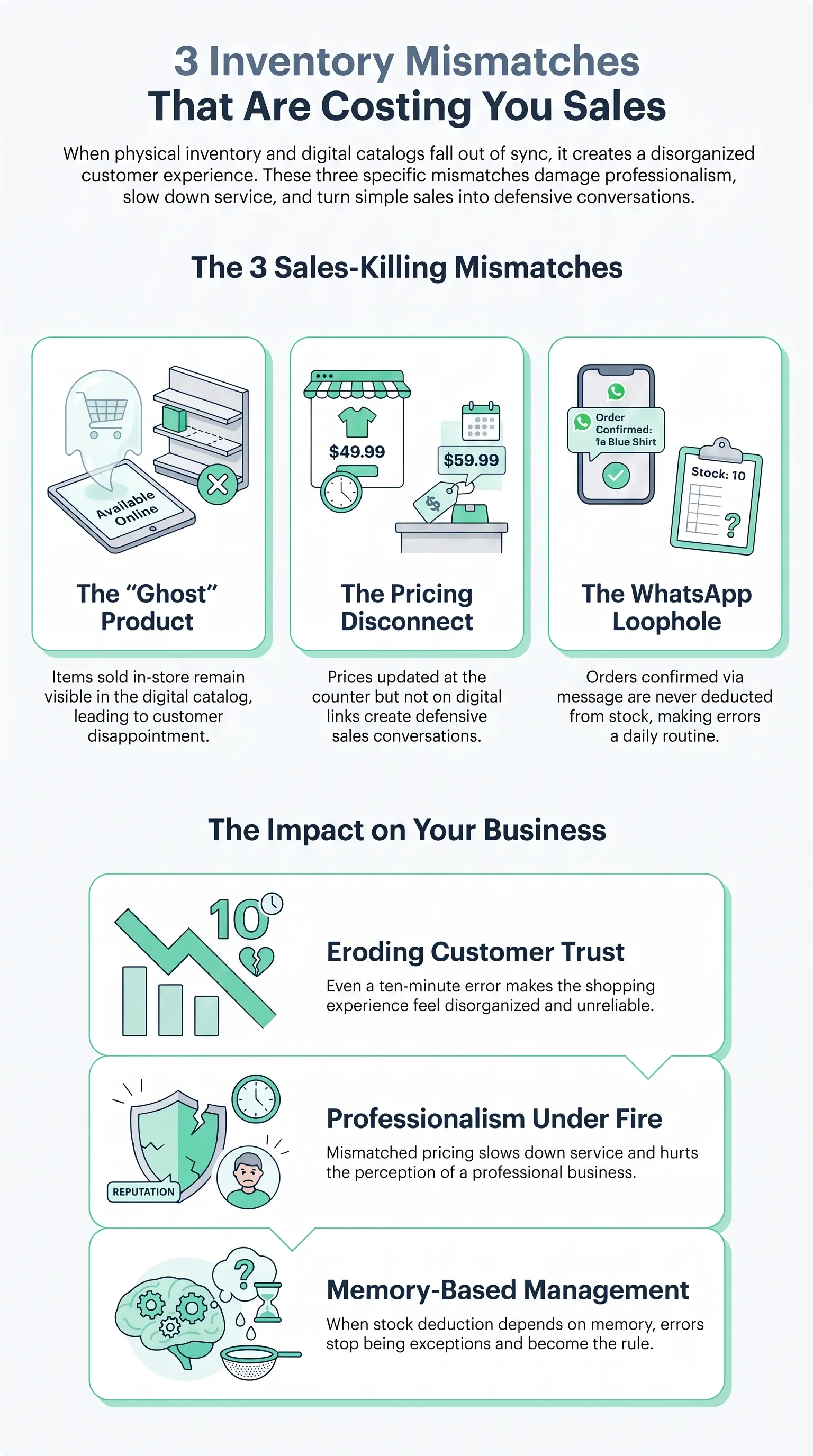
Almost every problem between physical inventory and a digital catalog falls into one of these three cases.
1. The product sold in-store, but it still shows up in the catalog
The customer opens the link, gets excited, chooses the product, and sends a message. The team replies that it is sold out. In the customer's mind, the experience feels disorganized. And many times, it is.
It does not matter whether the mistake lasted ten minutes or a full day. The effect is the same: trust goes down.
2. The price changed at the counter, but the old price is still on the link
This happens a lot with promotions, restocks, or supplier changes.
In the physical store, the price was already updated. In the catalog, it was not. The customer arrives with a screenshot, and a sale that should have been simple turns into a defensive conversation about why the number is different.
Mismatched pricing does not just slow service down. It also hurts the perception of professionalism.
3. The order comes in through WhatsApp, but it never becomes a real stock deduction
This is the trickiest mismatch because, from the outside, everything seems fine.
The customer sends a message, the team sets the product aside, payment is arranged, but no one turns that into a registered order. The result: the product still looks available to another salesperson, another channel, or even the owner at the counter.
When stock deduction depends on someone's memory, the error stops being an exception and becomes routine.
The mistake of copying physical inventory into the catalog
Even when inventory does connect with digital, many stores still build the catalog the wrong way.
The most common mistake is trying to replicate the logic of physical inventory on the customer's screen.
Behind the scenes, it makes sense to organize by type, size, box, aisle, supplier, or restock cycle. Physical inventory needs to help you store, count, and replenish.
But a catalog does not exist to store products. It exists to sell them.
Customers do not want to browse your back room. They want to quickly find what makes sense to them.
That is why a digital catalog does not need to mirror the stock room. It needs to work like a storefront.
If you dump dozens of categories, subcategories, and products into it without curation, the phone screen turns into clutter. Customers scroll too much, compare too much, ask too much, and buy less.
The logic of physical inventory is one thing. The logic of digital selling is another. In inventory, you organize to operate better. In a catalog, you organize to help the customer decide faster.
That difference matters a lot. A store can have excellent inventory control and still lose sales because the catalog was built like an open warehouse.
Integrating physical inventory with a digital catalog is not only about syncing stock. It also means separating two different functions:
- inventory takes care of availability
- the catalog takes care of product choice
When you mix those two logics, you lose efficiency on both sides.
If your online storefront still looks like a stock list, it is worth looking at how Kyte's digital catalog is structured and which products belong in the first layer of visibility.

How to connect inventory and sales control with a digital catalog in practice
In practice, this has to fit inside the routine. Good integration is not the most sophisticated one. It is the one your store can sustain every day. If your inventory and sales control still depends on memory, screenshots, or loose notes, the integration has not really happened yet.
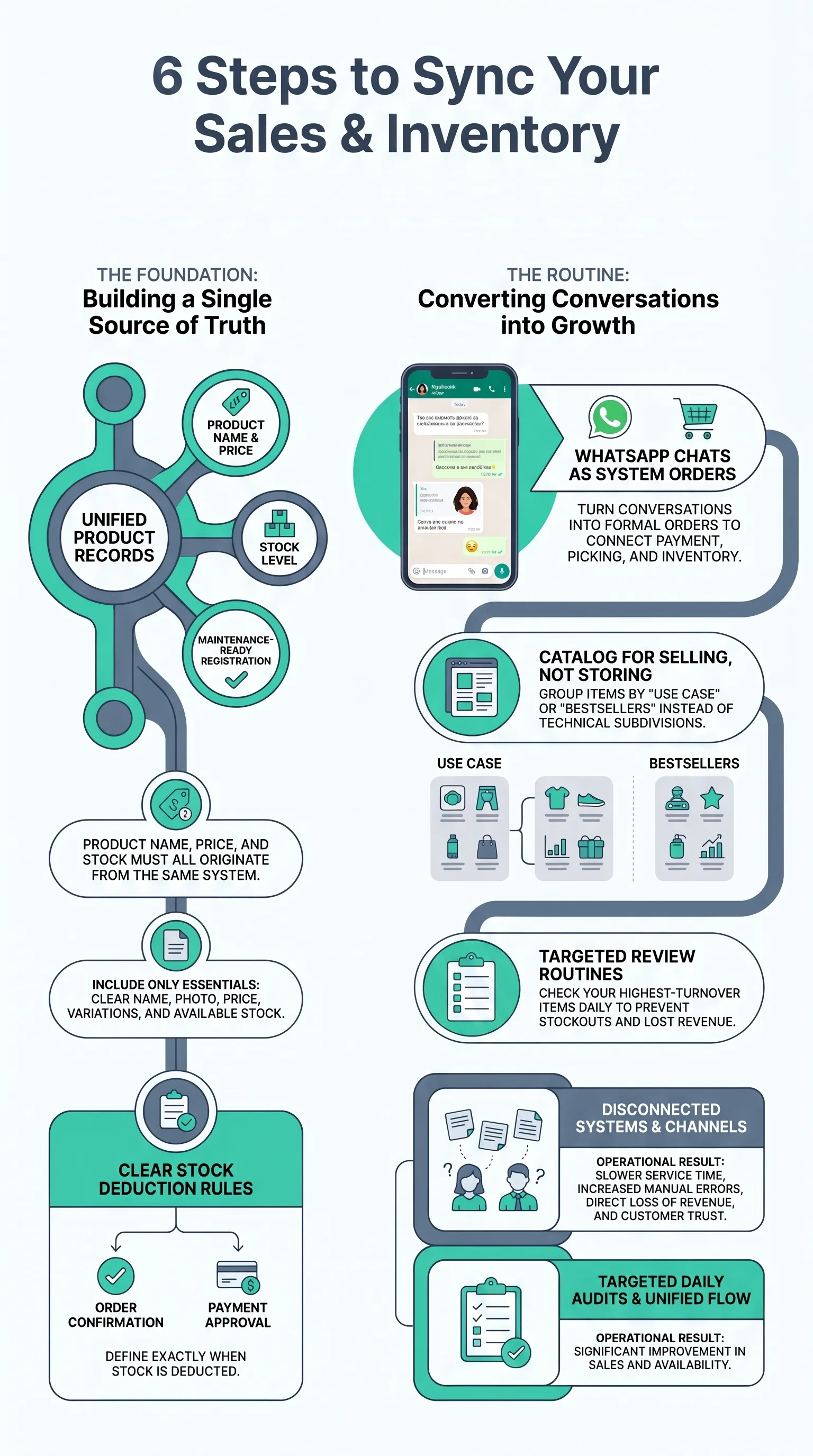
1. Choose a single source of truth
Product, price, and stock all need to come from the same place.
If the product name lives in one place, the price in another, and the stock in a third, you already created the problem before the first sale of the day.
The right question is simple: where does the store's official information begin? That place needs to feed everything else.
When the product record is unified, the chance of mismatch drops fast. When there are side paths and parallel updates, mismatches become inevitable. The best inventory and sales control starts before the sale. It starts in the product record.
2. Register products in a way your routine can actually maintain
A beautiful but incomplete product record does not solve anything. A simple and updated one does.
At a minimum, you need:
- a clear name
- a useful photo
- the right price
- variations when they exist
- available stock
If you run a clothing store, for example, it is not enough to register "floral dress" and leave size details for the chat. Customers need to see the product the way your operation can actually deliver it.
The same applies to cosmetics, jewelry, and accessories.
If the product record is weak, the whole integration becomes fragile.
Product registration should be seen as operational groundwork, not bureaucratic busywork.
3. Define exactly when stock is deducted
This point prevents half the mess.
Does the product leave stock:
- when the in-store sale is closed?
- when the order is confirmed?
- when payment is approved?
- when the item is separated?
There is no universal rule for every store. There is only the rule that needs to be crystal clear for your team.
A store with faster turnover often needs stock deduction closer to the actual sale. A store that works with conditional confirmation may use intermediate steps. What cannot happen is leaving it open to interpretation.
When each person deducts stock at a different moment, available inventory stops being reliable. And without reliable stock, there is no inventory and sales control that can support growth.
4. Make the order start as an actual order
Many stores sell through WhatsApp but still treat everything as just a conversation.
The customer asks, the team sends photos, confirms price, sets something aside, writes it on paper, and only later remembers to update inventory. Or simply forgets.
That flow feels lightweight. In practice, it is expensive.
If the sale came through WhatsApp, it needs to become an order inside the system. That is the only way to connect service, payment, picking, and stock deduction.
When that happens, the channel stops being a messy chat and becomes a real sales channel.
Order control exists for exactly that reason: taking the sale out of the conversation and into a process.
5. Organize the catalog to sell, not to store
Once stock and orders are connected, it is time to look at the storefront.
Some simple rules help a lot:
- fewer categories on the first screen
- clear emphasis on bestsellers
- grouping by use case or buying intent when it makes sense
- less visual excess
A cosmetics store may sell better with "gift sets," "daily care," and "most ordered this week" than with a first screen full of technical subdivisions.
A clothing brand may sell better with "work looks," "light pieces," and "new arrivals" than with a long tree of cold subcategories.
The catalog does not need to show everything at once. It needs to show the right things well enough for the customer to move forward.

6. Build a fixed review routine
Even with software, a store that sells well still needs a minimum level of discipline.
A simple routine already solves a lot:
- review stock and price at opening
- check the highest-turnover items halfway through the day
- end the day with a quick check of the most sensitive products
You do not need to count the whole store every day. You need to look more often at what sells the most and what is most likely to create discrepancies.
A study with roughly 24,000 SKUs across 11 stores showed that inventory inaccuracy directly affects both sales and stockouts, and that targeted audits have especially strong impact in items where the system says there is stock but the shelf says otherwise. In other words: when system stock is higher than real stock, the store loses both revenue and trust.
And that problem is not small. Research on fixing inventory inaccuracies at scale shows that stock errors do not affect counting alone. They affect operational decisions and real selling availability.
In short: checking inventory is more than control. It protects revenue.
7. Connect the physical store, catalog, and customer service into one flow
In the ideal flow, the product appears correctly, the customer chooses, the order enters the system, stock is deducted, and the team can follow everything in the same place.
That is what shortens service time and reduces mistakes.
If you already sell through chat, the next step is not opening one more channel. It is making the channels you already use work together better.
Inventory control, selling through WhatsApp, and the catalog need to operate as parts of the same daily routine, not as disconnected patches.
The right level of integration for each store stage
Not every store needs the same level of complexity.
Low-turnover store
If volume is still small, a simple setup already helps a lot:
- solid product registration
- daily review
- registered orders
- a catalog updated frequently
At this stage, the most important thing is building the habit before the mess grows.
Mid-turnover store
This store already sells at the counter, sends links, and closes orders on WhatsApp, but still depends too much on the owner's head or the memory of whoever is handling customers.
At this stage, the big gain comes from putting catalog, orders, and inventory inside the same app. This is where the store stops juggling between chat, spreadsheets, and manual checks.
High-turnover store
Here, the problem is usually a lack of operational discipline.
The more the store sells, the more important the following become:
- correct product registration
- a clearly defined stock deduction moment
- frequent checks on the fastest-moving items
- full visibility for the whole team
This is not enterprise-level bureaucracy. It is simply what a store needs when it does not want growth to come with more chaos.
What changes when inventory, catalog, and sales start working together
When integration works, the gains show up fast. The number of unnecessary messages drops. Customers ask less often whether something is still in stock, ask fewer price questions, and ask less about variations. Service speeds up because the conversation moves closer to the sale and farther away from "let me double-check that real quick."
The store also looks more professional, which matters a lot in small retail. And the owner stops spending the whole day putting out fires. Instead of correcting discrepancies, they can spend time restocking better, building better offers, and tracking what really sells.
That gain in trust is not abstract. A study discussed by The Wall Street Journal on low-stock transparency showed that accurately warning customers when stock is low reduces friction and lowers refunds for unavailable items. The lesson is simple: reliable information helps the purchase move forward, while shaky information slows it down. For a small store, that means strong inventory and sales control organizes the back end and improves the buying experience at the same time.
Conclusion
Omnichannel sounds complicated, but it does not have to be. For a small store, the idea is very concrete: stop selling at the counter and online as if they were two separate businesses.
When physical inventory and a digital catalog are integrated, the operation breathes easier. Customers see what is actually available, get accurate pricing, the order becomes a real order, and the team stops depending on memory to do the basics.
If your store still sells well but runs on scattered information, the next step is to organize the channels you already have. When your inventory and sales system works together with your catalog, the operation becomes lighter for the team and more reliable for the customer.
Kyte brings together a digital catalog, inventory control, order flow, and selling through WhatsApp inside the same process. That way, your store can sell in person and digitally with less rework and more clarity.
Frequently asked questions
Does the digital catalog need to show everything that exists in inventory?
No. The catalog needs to show well what helps the customer choose. You may have more items in inventory than in the main storefront. The mistake is turning the catalog into an open stock room on the customer's phone.
How do you avoid selling a product that already left the physical store?
You need three things: stock coming from a single source, a clear rule for when deduction happens, and a registered order when the sale starts digitally. Without that, the same mistake comes back.
Can I organize the catalog differently from the shelf?
Yes, and you should. The physical shelf is there to support storage and replenishment. The catalog is there to support purchase decisions. They serve different functions.
Is it worth selling on WhatsApp without an integrated catalog?
You can do it, but it costs more energy. Without an integrated catalog, the team answers more repeated questions, checks availability more often, and runs a higher risk of passing along outdated information.
Can inventory and sales control really be managed only from a phone?
For many small stores, yes. The main point is having the operation organized in the same place. If the phone is already where the sale happens, it can also be where inventory, orders, and the catalog stay connected.