Many people searching for an inventory control app are not ready to start with technology yet. What they want first is the basics: a clear way to write down what came in, what went out, and what is left.
That is exactly the point of this checklist.
Below, you will find a simple, editable inventory control checklist that is ready to fill out right now. You will also understand when manual control really helps and when it already makes more sense to move to an inventory control app.
What an inventory control checklist needs before you move to an inventory control app
The most common mistake is building a checklist that looks too perfect and abandoning it on the second day.
To work, an inventory control checklist needs to stay simple. It exists to help you look at the store and understand it quickly, not to look sophisticated.
The minimum fields are these:
- product name
- code or reference
- starting quantity
- incoming stock
- outgoing stock
- ending balance
- notes
That alone already solves a lot.
If you want to take it one step further, you can also include:
- category
- supplier
- minimum stock
- last updated date
The important thing is not to start with something too complicated.
Anyone running a small store needs a control system that fits into the daily routine. If the checklist takes too long to fill out, it stops helping and starts weighing down your routine. When that already happens right at the start, it is usually a sign that an inventory control app will help more than insisting on a manual system.
Inventory control checklist to fill out right now
You can copy this template into a spreadsheet, a notes app, or even print it.

If you want an even leaner version, use this one:

What each column means
- Product: A clear item name. Do not write "small blue cream" if you sell more than one similar item.
- Code: This helps a lot when the store has similar items, variations, or repeated names.
- Starting quantity: This is how much you had at the beginning of the period you are controlling.
- Incoming stock: Everything that came into inventory: new purchase, usable return, restock.
- Outgoing stock: Everything that left: sale, loss, exchange, internal use, damage.
- Ending balance: What is actually left after incoming and outgoing stock.
- Minimum stock: The number that works as a reorder alert.
- Notes: This is where quick notes go, like "slow mover," "sold more during promotion," or "restock Friday."
Filled example
If you want to picture it more clearly, think of it like this:

This example already shows the main things:
- what is moving well
- what needs restocking
- what deserves attention before it runs out
How to fill it out without getting lost
Having the checklist ready helps. What changes everything is the way you use it.
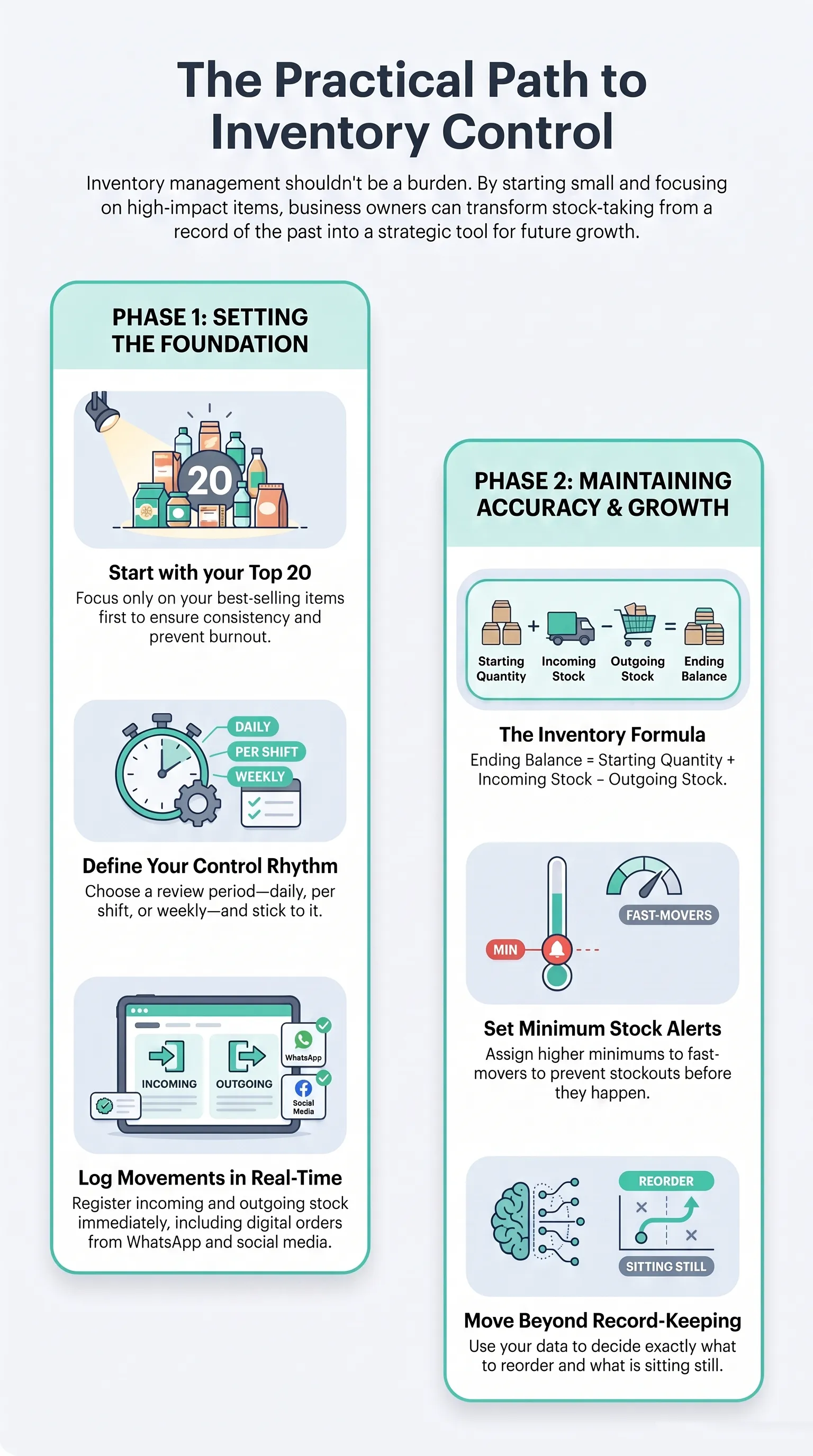
1. Start with a small number of products
If you have never controlled inventory properly, do not try to organize 300 items all at once.
Start with the 20 or 30 products that sell the most.
It is better to control an important part of the store well than to build a giant list and give up on it on the third day.
2. Define a control period
You can update it:
- every day
- every shift
- every week
For a small store with lower sales volume, a daily review already helps a lot.
For a store with higher turnover, the ideal is to record the movement the same day. The problem with delayed control is simple: when you go back to fill it out later, you no longer remember clearly what left stock.
3. Register incoming and outgoing stock at the right time
An incoming entry written down late becomes the wrong number. A forgotten outgoing item turns into a bad purchasing decision.
If you sell at the counter and also through WhatsApp, you need to register both flows. Many stores think they control inventory, but they only record in-person sales. Digital orders remain untracked, and the ending balance stops being reliable.
If that already happens often in your store, it is a sign that inventory control needs to leave paper behind and move into a more stable flow.

4. Close the balance at the end of the period
At the end of the day or week, confirm whether the math makes sense.
Simple formula:
ending balance = starting quantity + incoming stock - outgoing stock
If the number on paper does not match the shelf, pay close attention. That mismatch is exactly what hurts inventory and sales control.
5. Mark minimum stock
This is one of the most useful fields in the whole checklist.
Without minimum stock, you only notice the need to restock when the product is already gone.
With minimum stock, you see it earlier.
You do not need a complex calculation at the beginning. You can start with a simple rule:
- faster-moving product: higher minimum
- slower-moving product: lower minimum
Over time, you refine it.
6. Review the items that move most first
Not every product deserves the same level of attention. The items that sell the most need to be checked more often. They are the ones most likely to cause stockouts, rework, and rushed purchases when control fails.
7. Use the checklist to make purchasing decisions, not just to record the past
The checklist is not there only to write down what already happened. It should also improve the next decision:
- what needs to be reordered
- what is sitting still
- what sells the most
- what came in too heavily
If the list does not change how you buy, it has become nothing more than a record.
8. Define who updates the checklist
In many stores, the list fails because "anyone can fill it out." When that happens, no one feels truly responsible.
Even if more than one person touches inventory, it is worth making this clear:
- who logs incoming stock
- who logs outgoing stock
- who checks the balance
When that is missing, confusion and mismatched information follow.
How to adapt the checklist to your kind of store
The basic structure stays the same, but some fields matter more depending on what you sell.
Fashion or accessories store
Here, it helps to pay more attention to:
- color
- size
- collection
- turnover by variation
If you register "black T-shirt" without separating size, the control system already starts off wrong.
Home goods or household items store
The focus usually falls on:
- category
- supplier
- volume-based restocking
In this case, minimum stock helps a lot because many purchases are made in batches.
Cosmetics store
Here, more weight usually goes to:
- shade
- fragrance
- version
- repeat purchase
Similar products with similar names tend to mess up control very quickly when the reference is poorly written.
Store that sells at the counter and through WhatsApp
This is the scenario where manual control stops working sooner.
If you sell through more than one channel, the checklist needs to record everything in the same flow. If one channel stays out, the balance loses reliability and purchasing goes back to guesswork.

5 mistakes that ruin the checklist
1. Filling it out only when there is spare time
If you update it "when you can," the control is already late.
2. Mixing sales, loss, and exchanges
Outgoing stock is outgoing stock, but the reason matters. A product that was sold tells one story. A damaged product tells another.
3. Using confusing product names
When there are similar items, a badly written name creates mistakes during review and purchasing.
4. Tracking the counter and forgetting WhatsApp
This is a classic. The store records what left through the register and forgets the order that was closed in chat.
5. Ignoring minimum balance
Without a warning point, the checklist becomes a record of what already happened, not a tool to prevent stockouts.
When the manual checklist is no longer enough and the app becomes the next step
The checklist helps a lot. But there comes a time when it no longer keeps up with the pace of the operation.
That usually happens when:
- more than one person handles inventory
- the store sells through more than one channel
- there are many similar products or product variations
- you forget to update it on the same day
- volume already makes quick review impossible
At that point, the inventory control app becomes the next step. It moves into a system what has become too complex to manage on paper, remember, add up, and cross-check by hand.
If your inventory and sales control already depends on memory, screenshots, notebooks, and later checking, you have probably already passed that point.
Sales, product registration, and inventory need to talk to each other. When each piece stays separate, mistakes stop being the exception. That is the turning point where manual control stops being enough and the app starts saving real time.
Conclusion
A simple inventory control checklist already makes running the store much easier. It organizes the basics, shows what came in, what went out, what is left, and makes more visible the things you should no longer keep deciding in the dark.
If your inventory still lives in a notebook, in memory, or in a loose spreadsheet, start with this list. Fill it out, test it, and adjust it.
And when you realize the store's volume has already gone beyond what you can control by hand, then it makes sense to move to an inventory control app that brings inventory, products, orders, and sales into the same flow.
Frequently asked questions
What does an inventory control checklist need to include?
At minimum: product, starting quantity, incoming stock, outgoing stock, and ending balance. Everything else helps, but that already solves a big part of it.
Can I control inventory only on paper?
You can, especially in the beginning. The problem starts when volume grows, more people manage inventory, or the store sells through multiple channels.
When is it worth using an inventory control app?
When manual control already starts failing often. If the balance does not match, you forget outgoing stock, or you need to recheck things too often, the app already makes more sense.
How do I know when it is time to reorder?
Use a minimum stock field. When the balance gets close to that number, it is time to prepare the next purchase.
Why control inventory and sales in the same place?
When the sale enters the same flow as inventory, you stop logging everything twice. That integration is what reduces mistakes and rework.