
Sell on WhatsApp in 3 Steps: Profile, Speed, and Payment

Learn how to set up a professional profile and simplify payment so you can sell on WhatsApp more easily
Selling on WhatsApp without losing your mind is possible. You need three basic things: a profile with a catalog that builds trust, a reply in less than a minute, and frictionless payment through an instant bank transfer or payment link. Without that, the odds of the customer dropping the purchase are high.
Launched in 2009, WhatsApp became a platform with just enough structure for small business owners to sell and support customers. Even so, it is common to lose control of conversations and let messages get mixed up with orders. When a store owner does not separate one flow from the other, things start to slip and the customer disappears.
This article shows what to adjust in your profile, your customer support process, and your order closeout so WhatsApp can work like a predictable sales system. You will see how to organize the visual funnel, set up quick replies, and make payment easy to confirm in seconds.
Step 1: Profile Setup
If you sell through WhatsApp, you need WhatsApp Business. It has features the personal app does not: a catalog, automated messages, labels, and basic stats.
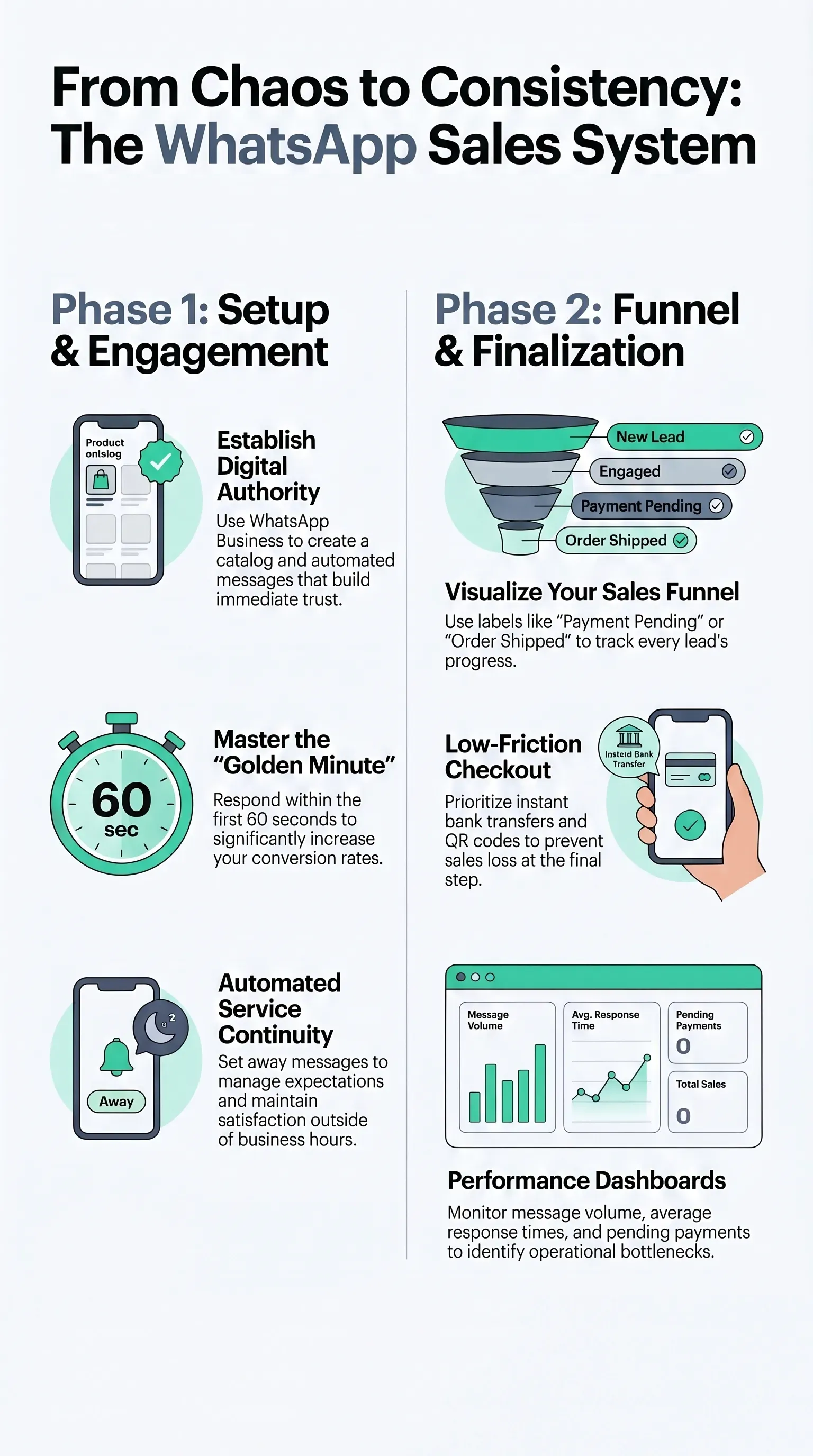
Setting up your WhatsApp Business profile is the first step toward turning the app into a trustworthy storefront. When WhatsApp is your main sales channel, every profile detail matters: your business name should match your brand, your photo should reflect your visual identity, and your description should clearly say what you sell and who you sell to.
The catalog works like a mini online store. Add clear photos, business hours, return and delivery policies. People who check your profile before messaging decide right there whether they trust you.
With that in place, the first barrier gets easier to clear. The customer sees authority and professionalism before the conversation even starts. Use pinned items or highlights to call out new arrivals and seasonal promotions.
And of course, your team does not work around the clock. That is why you should set up automated greeting and away messages. Anyone who messages outside business hours still gets an answer, and you set expectations for when they will hear back. That helps customer satisfaction from the start.
Your catalog cannot sit there untouched. Keep prices current, group products by collection, and describe the value of each item instead of just making the page look nice. That approach helps customers decide faster and reduces how much the seller has to explain inside the chat.
Before you publish the profile, review your phone number, website, address, and business hours. An outdated profile creates doubt.
Treat step 1 like a checklist:
- visual identity aligned with the brand;
- digital catalog with updated photos, policies, and prices;
- automated greeting and away messages;
- correct contact information and business hours.
With the profile in place, customers can move from message to purchase faster.

Step 2: Speed and Organization
Speed without control turns into chaos. Replying fast without knowing who is in each stage makes you lose sales that were already warm. When someone sends a message and gets no reply within a few minutes, they close the app and move on.
So start with the Golden Minute, the first minute after contact. In that window, conversion rates can rise sharply when the business responds right away. Create quick replies for greetings, order confirmations, and shipping instructions. The goal is not to sound robotic. The goal is to show up immediately. Speed signals professionalism and keeps the conversation active.
Then turn WhatsApp into a visual funnel with labels. Create statuses like "New order," "In negotiation," "Payment pending," and "Order shipped" so you can see exactly where each conversation stands.
You can combine that with segmented broadcast lists based on interest. That way, you prioritize urgent cases and do not have to restart the conversation from scratch each time.
Automated messages speed things up, but they do not replace human contact. The difference shows up in the details.
Build a simple dashboard with three numbers: messages received by status, conversations that moved back into "Payment pending," and average response time. Those three indicators show you where the operation gets stuck.
Quick Reply
Quick replies keep the Golden Minute alive. You confirm the message, thank the customer for reaching out, reinforce the value, and explain what will happen in the next 60 seconds.
Create templates for greetings, WhatsApp order confirmations, and next steps. That gives you a bank of ready-made structures and saves time on every reply.
The templates should be short, friendly, and already include the instruction the customer needs to follow: "Send your order number" or "What is your delivery address?" Those prompts speed up service because they give you the information you need to solve the issue in one shot.
When you reply, personalize the message with the person's name and product details. The difference between sounding like a bot and sounding like a real person who understands the order lives in those small specifics.
Once your quick replies are ready, define priority rules. Set sound notifications for labels like "New Order" and "Urgent." You can read everything else later.
Use the templates with humanized automation: mix prewritten text with personalized notes. That keeps the conversation moving and cuts friction.
Finally, monitor your average response time every week. If it starts going over one minute, revise your quick reply scripts. Once your team can reply that fast consistently, the Golden Minute stops depending on luck.
Organization with Labels
Labels turn WhatsApp into a system where every message has a destination.
Separate labels like "New order," "In negotiation," "Payment pending," and "Order shipped," each with its own color. That visual cue speeds up triage.
Update the label every time the stage changes. A conversation stuck in "New order" after payment is confirmed is the perfect setup for mistakes. Labels also feed the dashboard: you can see how many conversations sit in each stage and where bottlenecks are building.
You can also set automated reminders for conversations that stay in "Payment pending" for more than two hours. Pair that with segmented broadcast lists: one for people interested in a new collection, another for post-purchase follow-up, and so on. You stay fast without losing personalization.
Review the labels every week. "Payment confirmed" may need to split into "Bank transfer confirmed" and "Invoice paid" if volume makes that useful.

Step 3: Simplifying Payment
With your profile and service flow in place, one final step remains: closing the order.
Most sales get lost right here inside the WhatsApp checkout flow. Credit card fees also eat into your margin. That is why an instant bank transfer, a payment link, or another low-friction digital payment method should be a priority. Share the QR code, bank details, or link in your store profile or directly inside the conversation. Reinforce how quickly the payment clears and send the amount with a clear expiration window.
When the customer sends proof of payment, mark the conversation as "Payment confirmed" and wrap up the order right away. The next message should describe the next step. That flow reduces uncertainty and puts instant payment at the center of the WhatsApp checkout process.
Close this step with a quick checklist: updated payment details and QR code, automated payment instructions, and tested alternatives. When the customer knows what happens after they pay, the conversation does not need to restart with every transaction.
Using Instant Bank Transfer
Instant digital payment is one of the fastest ways to get paid. The confirmation comes through quickly, and the customer does not sit there waiting.
Keep the QR code and payment details visible in your profile, write clear instructions, and confirm the amount before you send the order. When the customer confirms payment, tag the conversation as "Payment confirmed" and send back a receipt or confirmation with the date and time.
That kind of confirmation reinforces transparency and reduces friction.
Set up reminder messages asking the customer to send proof of payment within 15 minutes, and trigger a thank-you message as soon as the payment comes in.
A consistent payment flow makes the business look professional, speeds up order release, and keeps the customer from reopening the chat just to ask whether the payment went through.
Use a dashboard or spreadsheet to track the time between sending the order and receiving payment confirmation. The goal is to stay under 10 minutes.
Other Payment Methods
Not every customer will use an instant bank transfer. So keep a short menu of options: online payment links with a short expiration window, invoices, and credit cards.
Create message templates for each payment method, with step-by-step instructions and clear conditions such as installment options, fees, and deadlines.
Integrate those options into the automated process. For example, when you mark a conversation as "Payment pending," trigger the right payment link and log the history in your spreadsheet.
Tie each option to a label: "Link sent," "Waiting on invoice payment," "Card approved." The visual funnel stays updated, and your dashboard shows which options customers use most and where conversion drops.
Payment variety keeps the conversation smooth for customers who do not want instant transfer and gives more confidence to people who are about to close the full amount.

Tips and Best Practices
You have already seen the three steps for selling on WhatsApp. Now here are four small adjustments to help the operation run even better.
Keep the human touch above automation. Personalize automated messages with the customer's name and the order. Send a short voice note when it makes sense. A fast template plus a personal note removes the artificial feel without sacrificing speed.
Use segmented follow-ups. Create lists for new orders, repeat customers, and abandoned carts. Send updates, usage tips, or restock alerts for sold-out items. The contact needs to provide value, not just push daily promotions.
Track the right numbers on a simple dashboard. Average response time, rate of payments confirmed in under 10 minutes, conversations stuck in "Payment pending" for more than 24 hours, and labels by stage. Those four indicators show what to fix: the profile, the quick replies, or the payment instructions.
Weekly checklist:
- update the catalog with current prices, collections, and return policies, plus clear photos and benefits;
- reinforce the Golden Minute with priority notifications and quick replies tested often;
- review labels and automations so the visual funnel matches the real operation;
- standardize messages by payment type such as bank transfer, link, or invoice.
That routine keeps WhatsApp predictable, ready to scale, and still human.
Conclusion
Selling on WhatsApp with predictability depends on three basic things: a trustworthy profile, fast customer service, and low-friction payment.
A professional profile builds trust, the Golden Minute keeps the customer engaged, and instant digital payment closes the sale without friction. These three pieces work better when you set them up together.
Once every stage is organized, track the three core numbers: average response time, the rate of payments confirmed in under 10 minutes, and conversations stuck in "Payment pending" for more than 24 hours. When one of those numbers gets worse, the problem shows up fast: your profile, your quick replies, or your payment instructions.
Start today: update your catalog, set up automated replies, and test the label checklist. Small changes in sequence create a system that feels human, works efficiently, and is ready to sell on WhatsApp every day.
Frequently Asked Questions
1. How do I sell through WhatsApp every day?
You need three steps: a profile with a catalog that builds trust, replies in less than one minute, and simplified payment through an instant digital method so customers do not drop off.
2. How do I make sure the customer gets a reply during the Golden Minute?
Set sound alerts for priority labels such as "New Order" and "Urgent," and keep quick replies ready for greetings, confirmation, and next steps. Track average response time every week. If it goes over one minute, revise the scripts.
3. What are the essential elements of a profile that sells on WhatsApp?
Consistent branding such as name, photo, and colors, an updated catalog with photos and benefits, and automated welcome and away messages. Those three items cut down on doubts before the first message.
4. How do I reduce friction in payment?
Prioritize instant digital payment with a QR code, payment details, and an automated message that explains how to send proof of payment. Use labels such as "Payment confirmed" and "Payment pending," and keep clear alternatives such as links, invoices, and cards for customers who prefer another method. Confirm payment right away in the chat.
5. How do I keep the visual funnel aligned with the real flow?
Review the labels every week. Each stage such as "New Order," "Payment pending," or "Card approved" needs to reflect what is actually happening. Log the rules on the dashboard, automate reminders for stalled conversations, and adjust label names or colors when customer behavior changes.
6. Which indicators show that WhatsApp is working as a sales channel?
Average response time below one minute, payment confirmation rate in less than 10 minutes, and conversations stuck in "Payment pending" for more than 24 hours. Those three indicators show where you need to act: profile, quick replies, or payment instructions.